The definition
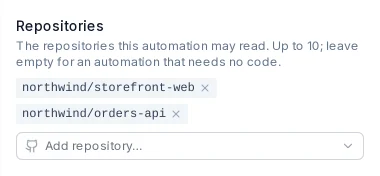
A name, a prompt, the coding agent and model, and up to ten repositories. An automation without a repository works from its prompt, input files and the web.

An automation is a saved prompt that ProPR runs on demand or on a schedule. Each run is an isolated ProPR task run that researches your repositories or the web and writes a Markdown report. You decide whether the report stays a report or becomes work.
propr automation run.Write the instructions once. ProPR runs them with the same isolation, models and receipts as every other task.

A name, a prompt, the coding agent and model, and up to ten repositories. An automation without a repository works from its prompt, input files and the web.

Attach up to ten files: a checklist, a dependency policy, a list of competitors. Each run finds them in its workspace, listed in its prompt.
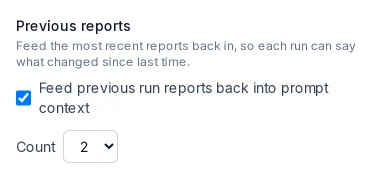
Feed the last one to five reports back into the next run, so a weekly review compares this week with the last.
One trigger primitive serves all of them, so a scheduled run and a run from chat produce the same record.
POST /api/automation-definitions/:id/runs starts a run from GitHub Actions, a webhook relay or an external cron. Send an Idempotency-Key header and a retried call returns the same run.propr automation lists automations, starts runs, waits for them, prints reports to stdout, and approves, rejects or cancels runs.
Five-field cron or @hourly, @daily, @weekly, @monthly, evaluated in UTC, at most every 15 minutes. Presets cover hourly, daily at 09:00, weekdays at 09:00 and Mondays at 09:00, and the editor previews the next run. Missed slots collapse into one run.

ProPR never parses the report for commands. An optional acting step reads it in a second isolated run and acts through ProPR's MCP tools.

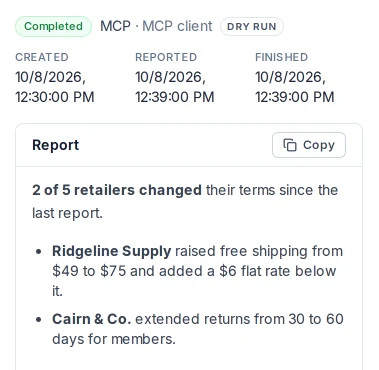
The default. ProPR saves the report for you to read, and the run ends there.
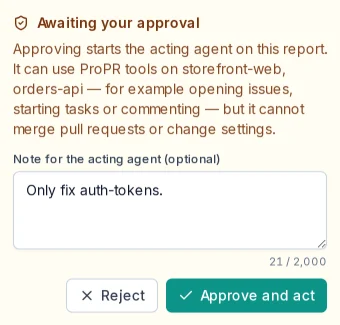
The acting step waits for you. Read the report, then approve it with an optional note for the acting agent, or reject it and keep the report. Automations with a repository also notify your Inbox.
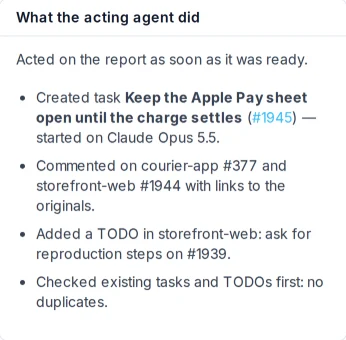
The acting step runs as soon as the report is ready and creates tasks, plans, goals, TODOs and pull-request comments on its own.
The acting step holds a short-lived ProPR MCP grant with read, plan and execute scopes, limited to the automation's repositories. ProPR revokes it when the step ends. The grant appears in Connected apps, and the MCP Log records every call.

Every automation reads its repositories. Add web access or ProPR tools only where the job calls for them.

| Capability | What the report step gets | Coding agents |
|---|---|---|
| Read repositories (default) | A read-only checkout of the selected repositories. Without it, the agent starts in an empty workspace with no source code. | All five agents |
| Web access | Web search and page fetches while it researches. | Blocked natively when off on Claude Code and Codex. Antigravity CLI, OpenCode and Mistral Vibe receive the restriction as an instruction. |
| ProPR tools | Read-only ProPR MCP access to tasks, goals and plans. | Claude Code and Codex |
Preview + approve and Auto need an agent that uses ProPR's MCP tools: Claude Code or Codex. Other agents run automations as dry runs. ProPR tools and the acting step also need the instance's MCP server turned on. To give an automation your own MCP servers and skills, select an extension profile.
Before a scheduled, HTTP, MCP or CLI run starts, ProPR checks the agent's capacity in Agent Tank against a pause threshold, 90% by default.


Every Monday the agent reviews the repository's dependencies and reports what needs attention. In preview mode you approve with a note such as "Only fix auth-tokens", and the acting step files exactly that work.
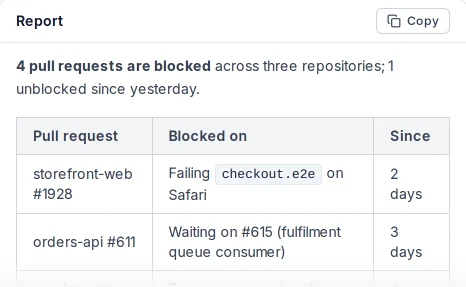
"Review open pull requests in these repositories and summarize which ones are blocked and why." A digest of stalled work that compares each run with the previous report.

Summarize new issues overnight, then ask your chat client what last night's triage run reported. A GitHub Actions step can trigger the same automation and save its report to a file.
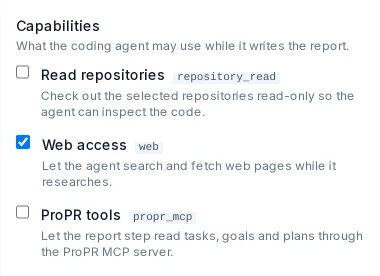
An automation with web access and no repository. Tell your chat client to run your competitor scan now, and read the report when it lands.
The CLI waits for the run and prints the Markdown report, so a workflow step can save it. The exit code says whether the run completed, timed out, was skipped, or is waiting for approval.
npx propr-cli automation run "$AUTOMATION_ID" \
  --idempotency-key "$GITHUB_RUN_ID" \
  --source github-actions \
--wait > report.mdYou create and edit automations in the web UI or over the REST API. MCP and the CLI start runs, read reports and decide on the acting step. Each automation belongs to one owner, and schedules run in UTC.
The Automations guide covers schedules, triggers, the cost gate and run states. The CLI reference covers propr automation, and the MCP documentation covers connecting a chat client.