ProPR 0.9.0 · October 2026

Goals, Automations, and restricted agent networking.

ProPR 0.9.0 is the largest release since the first public version. Agents take on standing objectives, recurring work runs on a schedule, agent containers get a tighter network and credential boundary, and ProPR reaches you on the desktop, in the browser's notification tray, and in your chat client.

Overview

New

Goals: give an agent an objective, then steer it.

A task answers one request. A goal keeps a coding-agent session working toward an objective until it is done, and you stay in the loop the whole way.

  • Two ways to run

    The agent implements directly while ProPR owns every commit and checkpoint on a draft PR, or the agent orchestrates: it breaks the objective into issues and drives them through ProPR's normal task path.
  • Corrections mid-run

    Send an instruction or a question at any time. The goal timeline records it verbatim. Pause, resume, cancel, or change the model without losing work.
  • Native where the agent supports it

    Claude Code and Codex run goals natively with live steering. Antigravity CLI resumes its own conversation and takes corrections at safe boundaries.

How Goals work

A running goal on northwind/storefront-web: Move checkout to the Payments SDK on Claude Opus 5.5, 37 minutes in, with its objective and two checkpoint commits on the draft PR
A running goal: its objective, model, elapsed time and checkpoints on the draft PR.
A goal waiting on its operator: the agent asks whether offline photos upload over cellular, with suggested answers and Answer, Pause and Cancel
A goal waits on a question, with suggested answers.
A correction typed into the running goal, with the model for the next continuation
Send a correction mid-run and pick the model for the next continuation.

New

Automations: recurring agent work, on a schedule.

An automation is a saved prompt that ProPR runs as an isolated task. Each run writes a Markdown report, and you decide whether that report turns into work.

Start it any way

Run now from the web UI, a UTC cron schedule with presets, an HTTP call with an Idempotency-Key, your chat client over MCP, or propr automation run from CI.

A report with memory

The agent reads the selected repositories, the web if you allow it, its input files and up to five previous reports, then writes Markdown. Report runs never commit or push.

Actions at your autonomy

Dry run is the default. Preview + approve waits for your approval; Auto acts at once. The acting step works only through ProPR's MCP tools and cannot merge, deploy, change settings, or trigger or approve runs.

How Automations work · Automations guide

Run history for one automation: runs started by schedule, MCP, the CLI from GitHub Actions, the HTTP API and Run now
Every trigger lands in the same run history.
A preview-mode run awaiting approval, with the note "Only fix auth-tokens." for the acting agent
Preview + approve: read the report, then approve with a note.
New task dialog: pick the repository, write the prompt, then Run task or Plan first
Pick the repository, write the prompt, and run it. Plan first sits one click away.

New

New Task: one instruction, straight to a PR.

Small, clear changes skip the plan. New Task sends one instruction straight to implementation with the repository's settings.

  • Still traceable

    ProPR files a GitHub issue and runs the normal implementation task, so the issue, task and pull request link up exactly as planned work does.
  • The create button follows you

    The primary action is New Task by default, New Plan in Plans and Planner Studio, and New Goal in Goals. The other two sit in its menu.
  • Start from anywhere

    A repository's New task prefills the repository, and a to-do's Run task prefills its text. New Task remembers the repository, agent and model from your last submission. Attached images render inline in the GitHub issue.

New

Safer execution: restricted network and read-only tokens.

Agent containers get a tighter boundary on what they reach and what they change. ProPR creates every branch, commit, push and pull request itself.

Restricted network mode

Optional, and off by default. Restricted mode starts the agent container with no network. Its only route out is a per-run proxy on the worker that allows the agent's model provider, GitHub, npm and PyPI, plus the hosts you add. It needs no elevated container privileges.

Instance and repository policy

Set the mode and allowed hosts in Settings, and enforce restricted mode across the instance if you want. Repositories choose their mode and extra hosts under network: in .propr/workflow.yml; enforcement overrides a repository's open.

Denied hosts on the timeline

Each restricted run lists every denied host, with attempt counts, on the task timeline. A missing allowlist entry is one look away.

Where it applies

Implementations, follow-ups, /fix, reviews, goals and indexing runs. Plan generation runs on the open network. Restricted mode needs a Linux Docker host, and Antigravity CLI falls back to open mode, or is refused when restricted mode is enforced.

Fails closed

If ProPR cannot read the network policy, the run fails. If the worker stops, its restricted containers lose network. The allowlist matches hostnames, so an agent still reaches any allowed host it holds credentials for.

Read-only agent tokens

Implementation, follow-up, review-fix and direct-goal agents get a read-only GitHub token, and the repository's Git data mounts read-only. Orchestrating goals keep write access to drive their issues.

Execution safety documentation
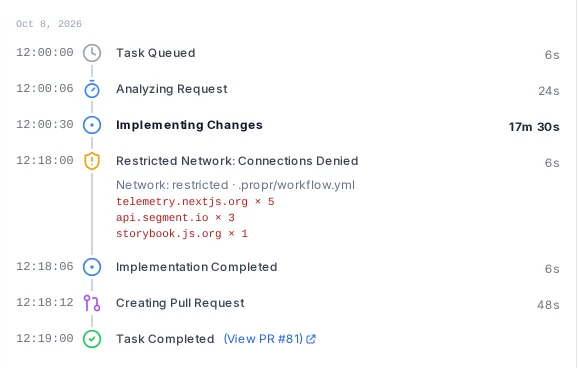
Timeline step for a restricted-network run: the allow list comes from .propr/workflow.yml and three hosts were denied
Denied hosts, with attempt counts, on the task timeline.

New

Repository rules live in the repository.

Two optional files in .propr/ let a repository own its workflow. ProPR reads them from the base branch, so every change to them goes through review.

Lifecycle hooks

.propr/workflow.yml runs your commands around the agent: after_create, before_run, after_run and before_remove. Add an instructions file, validation commands that ProPR runs and reports after the agent exits, preview types, and a repository-wide limit on parallel tasks.

Network, spend and merge

The same file sets the repository's network mode and allowed hosts, a per-run spend cap, and its auto-merge policy. An invalid file fails the run before the agent starts.

Pull request templates

.propr/pr-template.md shapes the title and body of the PRs ProPR opens, with placeholders such as {{issue_number}}, {{model}} and {{cost}}. Without one, ProPR appends the repository's GitHub PR template.

propr init scaffolds both files with comments, and propr repo validate checks the template locally. Repository workflow · PR templates

New

Guardrails for runs nobody is watching.

Four controls bound what an unattended run costs, how long it hangs, and what merges without a person.

Protected paths for auto-merge

The auto_merge block in .propr/workflow.yml decides whether ProPR arms auto-merge and with which method. A PR that touches a protected path, or anything under .propr/, waits for a human merge. When ProPR cannot read the policy or the diff, it skips auto-merge and says so on the PR.

Spend caps

Cap a run's estimated cost per task, per repository or for the whole instance. At the cap ProPR stops the run, publishes its partial work, and notifies you in the Inbox and on the PR.

Stall watchdog

ProPR stops an agent that goes silent for 10 minutes, 30 during a running tool call, or streams empty output, and publishes its partial work. Before, a hung agent held its worker slot until the 24-hour timeout.

Replacement runs

When a worker dies mid-task, ProPR starts one replacement with the same agent and model, continuing from the pushed branch. A transient provider error gets up to two replacements by default. Rate limits and credential errors never trigger one.

Redesigned

Tasks becomes a triage console.

One row per task, with status, agent, duration and review score. A run-count chip sums up earlier runs, so a long PR history takes one line.

  • Open it beside the list

    On screens 1280px and wider, a task opens in a pane next to the list and its link goes in the URL. j and k move between rows, and Esc closes the pane.
  • Every run on one timeline

    Implementation, reviews, fixes and Ultrafix cycles list in order. Pick a run to switch the screenshots, trace and changed files to it.
  • Scores over time

    ProPR keeps every review score, and the task shows the PR's score trend.
  • Commands on the newest run

    /fix, /review and /ultrafix appear only on a task's newest finished run, so an old command can't be replayed.
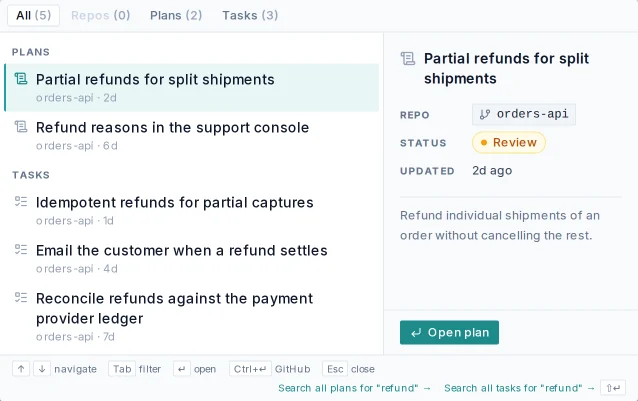
  • Find anything

    Cmd/Ctrl+K opens a command palette with a live preview of tasks, plans and repositories.
The Tasks console with a task open beside the list: Show delivery windows at checkout in its second Ultrafix cycle, every run on one timeline with review scores of 5 and 7, the changed files and the live execution trace
A task open beside the list: every run on one timeline, the changed files and the live trace.
The Cmd/Ctrl+K palette searching "refund": matching plans and tasks on the left, a live preview of the selected plan on the right
Cmd/Ctrl+K searches plans and tasks with a live preview.

New

Task assignment, kept in sync with GitHub.

Every task is assigned through the issue or pull request behind it, so ProPR and GitHub always agree on who owns the work.

Filter by owner

The Tasks screen shows assignees and filters by Assigned to me, Unassigned or chosen people. propr task list --assignee me and MCP list_tasks take the same filter.

Hand off finished PRs

Per repository, ProPR assigns each pull request when its work completes, to a default assignee or the source issue's author, and can request their review. It never removes an existing assignee.

The assignment gate

With the gate on, an assigned pull request starts follow-up work only from its assignees' comments. Unassigned PRs, failed-CI follow-ups and the Ultrafix loop are unaffected.

Goals, plans, automations and to-dos also show who created them. How assignment works
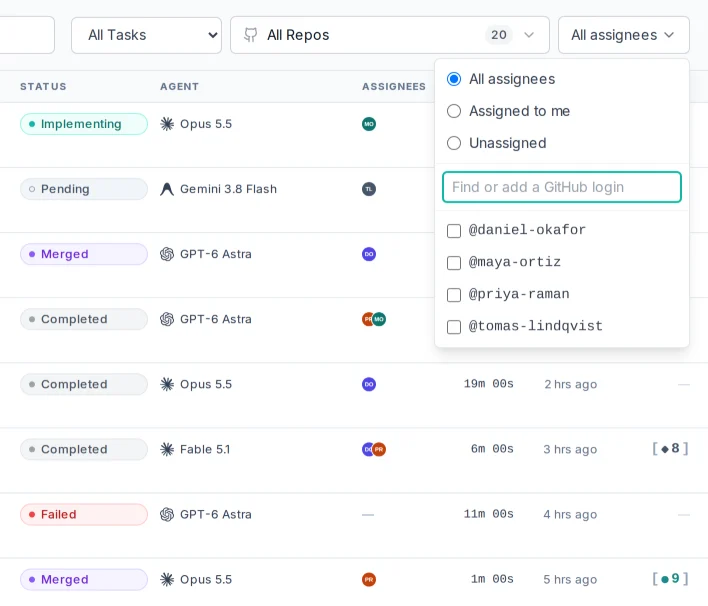
Tasks with an Assignees column: each pull request shows the people GitHub has assigned, and the assignee filter narrows the list to me, to nobody, or to any teammates
Assignees on every row, and a filter for your own work.

New

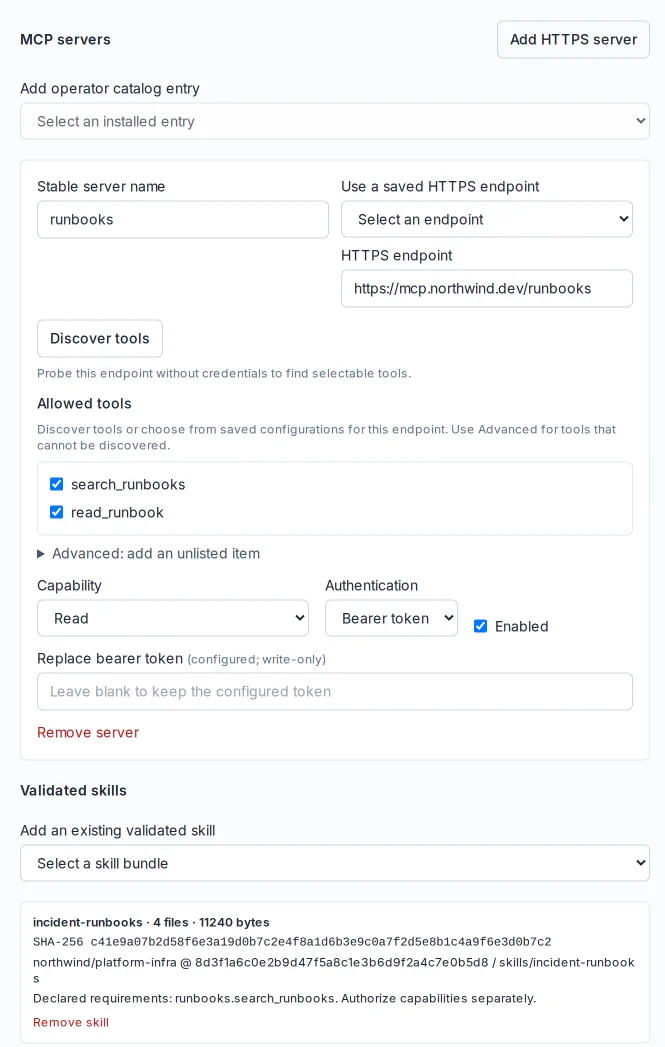
Agent extensions: your MCP servers and skills in task runs.

An extension profile gives Claude Code and Codex task runs a chosen set of MCP servers and skills. Select one on New Task or an automation.

Listed tools only

Add a remote MCP server, discover its tools, and allow the ones the agent may call. Write servers need the run's explicit write authorization.

Credentials stay out

Bearer tokens stay encrypted in ProPR. The agent reaches each server through a per-run gateway that closes when the run ends.

Pinned skills

Import skills from a GitHub repository or an archive. ProPR pins the commit and digest and mounts them read-only. Every profile edit is a new revision.
How agent extensions work

An agent extension profile: the runbooks MCP server over HTTPS with two read-only tools and a write-only bearer token, plus the incident-runbooks skill pinned to a commit with its SHA-256 digest
An MCP server with two allowed tools, and a skill pinned to a commit.

New

ProPR Desktop for Linux and macOS.

The desktop app runs the ProPR web UI in a sandboxed window and connects to one or more ProPR instances.

  • Browser-approved pairing

    Enter an instance address, approve in your browser, and confirm the GitHub account in a native dialog. Tokens live in the OS credential store.
  • Saved instances and accounts

    Keep several instances and several GitHub accounts, even two accounts on the same instance, and switch between them.
  • Native menus and tray

    A keyboard shortcut for every menu action, an application menu button on Linux, a tray with task and plan counts, and native notifications you switch on per device.
  • Guided local setup on Linux

    Set up this computer signs you in to GitHub through your browser, starts a local ProPR stack with the same setup engine as the CLI, then opens browser pairing.

Download ProPR DesktopGitHub release

ProPR Desktop connecting to an instance: a display name, Northwind Labs, the instance URL and a Connect button
Add an instance by name and address, then approve the connection in your browser.
Personal notifications: Inbox and Push switched per category, with Indexing turned off and push on for plans, reviews, pull requests and system failures
Inbox and push, chosen per category.

New

Inbox, installable app, and push notifications.

ProPR events land in one Inbox, and the ones you choose reach your phone or desktop as push notifications.
  • One Inbox

    Plan, task, review, pull request, indexing and system events, each opening the task, plan or goal it belongs to. Read and dismiss state syncs across tabs. Dismissing never cancels work.
  • Triage at a glance

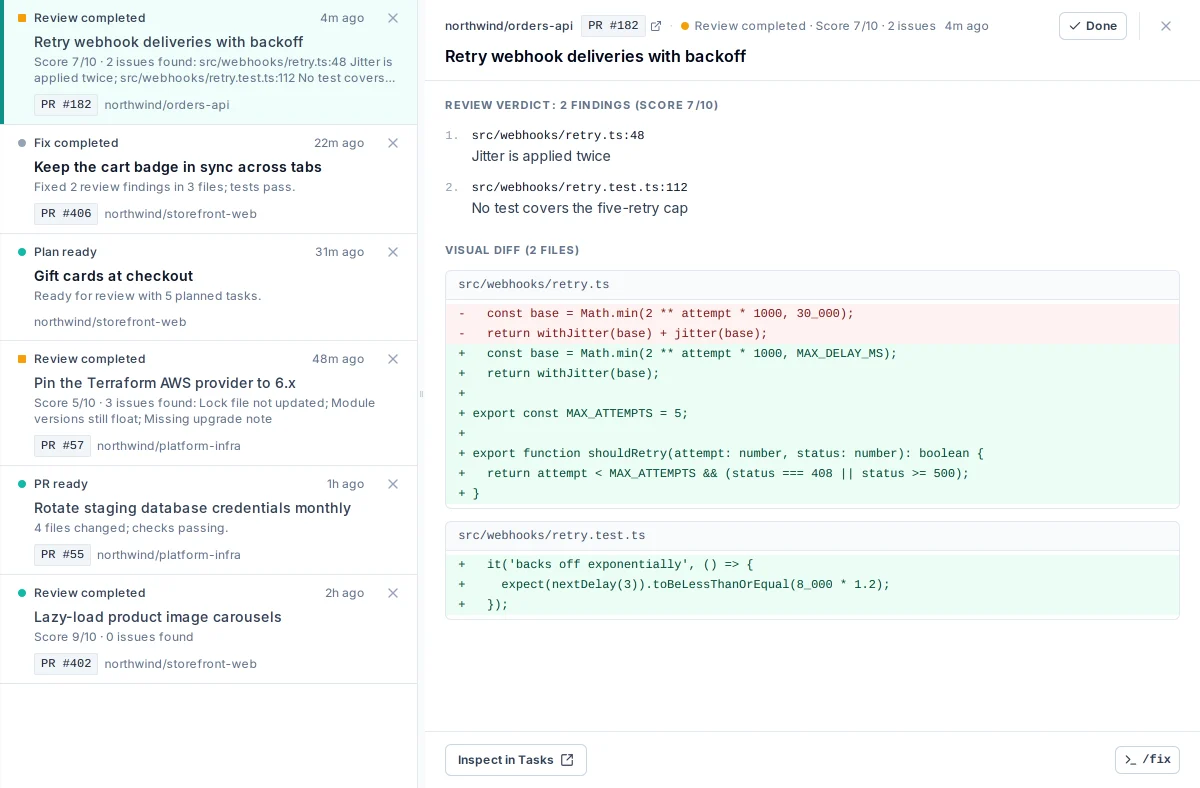
    On wide screens the Inbox is a queue with a verdict beside it: the review score and findings, a short diff, and the next command. j/k step through, x dismisses and opens the next item.
  • Install it as an app

    Install the web UI from your browser and enable push on each device. On iPhone and iPad, add it to the Home Screen from Safari first.
  • Your rules

    Choose Inbox and Push per category, set quiet hours, and mute a noisy repository. Muting stops notifications; automation keeps running.

ProPR on mobile

The Inbox as a triage console: the queue on the left, and the open review’s verdict on the right with its 7/10 score, two findings pinned to file and line, and the lines of the fix it read
Pick an item; its verdict, findings and diff open beside the queue.
Work the Inbox down to zero./fix and x clear an item and open the next; j and k step through.
The Inbox: review results with scores and findings, a finished fix, and a plan ready to approve, newest first
Every review, fix and finished run in one list.
Quiet hours from 22:00 to 07:00, Europe/Lisbon: push waits until morning while the Inbox updates immediately
Quiet hours hold push; the Inbox updates right away.

New

Run ProPR from your chat client over MCP.

ProPR 0.9.0 ships an authenticated MCP server at https://<your-instance>/api/mcp. Turn it on in Settings and set the scope ceiling.

You grant, you revoke

Each connection goes through a consent screen with a repository picker, and optional scopes start unchecked. Connected apps lists every grant with its repositories and last use, and revokes it in one click.

The whole workflow

Ask what is running and what needs you. Create and refine plans, launch goals and tasks, run automations and approve their next step, review pull requests with the models you pick, fix selected findings, and resolve merge conflicts. Search and read code in granted repositories without cloning.

Receipts you can follow

Long operations return receipts that move from accepted to running to a final state. A work overview joins tasks with their PRs, reviews and checks in one call.

Answers from the shipped docs

Docs tools search the documentation bundled with your release, so answers match the version you run. A settings finder tells you where each setting lives.

An access log for admins

The MCP Log records tool names, outcomes and timing. Arguments and result bodies stay out of it.

Your infrastructure

Agents, clones and task state stay on your server. Requested results travel to the chat client and its model service, as any chat answer does.

MCP from chat

The MCP scope ceiling: read, plan, publish, execute and review allowed; merge, deploy and manage left off
The admin sets the scopes chat clients may ask for.
The MCP Log: each tool call with its connected app, outcome and duration; one call is denied with FORBIDDEN_REPOSITORY
The MCP Log: every tool call, its outcome and timing.

New

Plan history and safer refinement.

A plan is a working document, and now it keeps its past. ProPR stores the plan before every generation, refinement and edit.

  • Restore any version

    Open Plan history, preview a saved version, and restore it. Restoring saves the current plan first, so nothing is lost.
  • Refinement returns the whole plan

    Ask for one change and get the complete plan back, unchanged tasks included.
  • No silent partial plans

    Generation validates every issue before ProPR accepts it. Incomplete output fails with an error and leaves your saved plan alone.

Planning in ProPR

Plan history: the versions saved before each refinement and the first generation, with a preview and Restore this version
Plan history keeps the version from before each change.

New

Visual previews on pull requests.

Review UI changes by looking at them. The agent captures the changed screen, and ProPR posts it on the PR. How visual previews work

Only when it is visible

The agent captures images or video only when the change shows up on screen, using the repository's own tools: Playwright, Storybook, a browser or an emulator. Follow-up commits get fresh media.

Inline in GitHub

Previews publish as GitHub attachments, so they render in the pull request. Task and goal pages show them in a zoomable gallery.

Full-resolution originals

With Connect Plus, ProPR also keeps each full-resolution original in managed storage and links it from the PR.

Visual evidence on a task: the agent’s capture of the changed screen with its description, one of two captures
The agent’s capture of the changed screen, on the task page.

New

Synthetic pools: one model name, many accounts.

A synthetic pool is a virtual agent and model backed by several direct agent accounts. Repositories, the planner and reviews point at the pool, and ProPR decides which member runs each task.

  • Priority tiers

    Put the primary account at the top and a fallback below it. Within a tier, route round robin or by remaining usage.
  • Usage caps

    Cap a member at a share of its session or weekly allowance, measured by Agent Tank.
  • Failover

    A retryable provider error moves the same task to the next member in the same workspace and branch.
  • Honest attribution

    The UI shows the pool; task details and the LLM log show the account and model that actually ran. Manage pools in Coding Agents or with propr agent pool.

Improved

Agent Tank now ships inside ProPR.

Agent Tank shows how much subscription capacity each agent has left. In 0.9.0 it is bundled in the ProPR agent image: pick Bundled in Settings and ProPR runs it on demand with the credentials your tasks already use.

  • Three modes

    Disabled (the default), Bundled (recommended), or External for an Agent Tank daemon you already run. Upgrades keep an existing daemon connection.
  • Covered agents

    Claude Code, Codex and Antigravity CLI. Their usage bars show reset countdowns, and each LLM log entry records the usage it consumed.
  • Capacity drives automation

    Scheduled automations skip or defer when an agent nears its limit, and Ultrafix escalation passes over models that are out of capacity.
  • Usage history

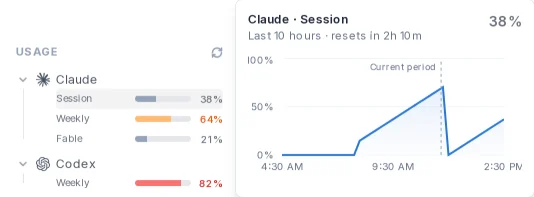
    Hover a usage row in the sidebar to see that limit over its last two periods. Analytics charts every provider's usage from 24 hours to 14 days.
  • One command

    propr tank bundled switches it on from the CLI.
Agent Tank quota usage over the last seven days: the Claude session window filling and resetting through each working day, and the weekly windows of Claude, Codex and Antigravity climbing toward their resets
Seven days of subscription capacity, per agent and window.
Hovering the Claude session bar in the sidebar opens its last ten hours: the window filling and resetting, now at 38% with 2h 10m to the reset
Hover a usage row for its recent history.
Agent Tank setting with Disabled, Bundled and External modes; Bundled is selected and ready
Disabled, Bundled or External, in Settings.
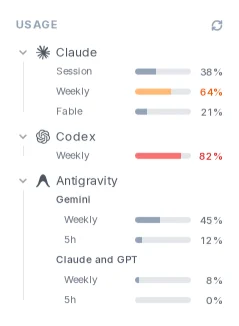
Agent Tank in the ProPR sidebar: Claude session, weekly and Fable windows, the Codex weekly window, and Antigravity’s weekly and five-hour limits for Gemini and for Claude and GPT, each as a usage bar
Live usage per agent in the sidebar.

Improved

Sharper review commands and CI control.

Pick exactly what to fix

Reviews number merge blockers F1, F2 and optional suggestions S1, S2 across the whole PR. /fix applies the pending blockers, /fix F20 S3 S5 applies exactly those records, and /fix all applies every pending finding and suggestion. Each review ends with a copyable /fix line to trim. One malformed ID rejects the whole command, so nothing half-applies.

Cancel superseded CI

Pick the workflows to cancel for each repository. When a follow-up starts implementing, ProPR cancels those runs on the exact PR head being replaced, and restarts them if no new commit lands. Closing a PR uses the same policy.

Checks that never block

Mark check-name patterns as non-blocking. Their failures stop holding up /merge, auto-merge and Ultrafix, and GitHub still shows the result.

Epic progress on the PR

As child PRs merge, the epic PR keeps one comment counting how many have landed, and posts a confirmation when the last one merges.

Epics that keep moving

When a repository disallows GitHub auto-merge or a PR has no CI, ProPR merges the plan's PRs itself once every gate passes, and suggests the repository setting.

One CI-wait comment

Ultrafix's "waiting for CI" comment updates in place: it becomes the next review, or the stop notice if CI never settles.

PR commands

Updated

New default models and refreshed agents.

Claude Code

Claude Opus 5.5 is the new default. Claude Fable 5.1, Sonnet 5.5 and Haiku 5.5 join the catalog, and the plain fable, sonnet and haiku aliases select them. Older models move behind the legacy fold.

Claude Code in ProPR

Codex

GPT-6 Astra is the new Codex default. GPT-6.1 Sol, GPT-6 Sol and GPT-6 Luna join the catalog.

Codex in ProPR

Antigravity CLI

One entry per model with a separate reasoning selector: Gemini 3.8 Flash (the default), Gemini 4 Argon (recommended for planning and review), Claude Sonnet 5.5, Claude Opus 5.5 and GPT-OSS 120B. Gemini 3.1 Pro is retired, and its label runs on Argon. Goals run through resumable conversations.

Antigravity in ProPR

Mistral Vibe

GLM 5.3 and GLM 5.2 join Mistral Medium 3.5 and run with the same Mistral credentials. Devstral configurations move to Mistral Medium.

Mistral Vibe in ProPR

OpenCode

Big Pickle becomes the default, and the free lineup adds Muse Spark 1.2 and 1.3, Nemotron 3.5 Lightning, and Ling 3.0 Flash Fin.

OpenCode in ProPR

Pinned CLIs

Every agent image ships an updated, pinned CLI: Claude Code 2.1.293, Codex 0.160.0, Antigravity CLI 1.4.0, OpenCode 1.18.31 and Mistral Vibe 2.25.8.

Redesigned

A dashboard that starts with what needs you.

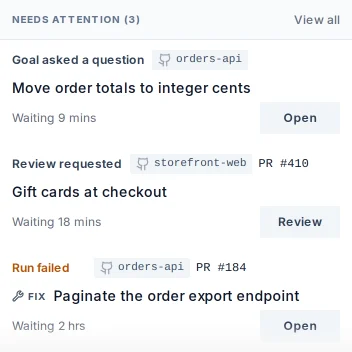
The dashboard now opens on Needs attention: failures and decisions waiting on a human. Happening now shows running tasks and goals with their current step and last output. Completed groups finished work, and earlier updates load on demand.
  • Live, push-driven

    Updates arrive over the socket, and hidden tabs reconcile when you return.
  • Analytics

    Analytics reports runs per task, first-time pass rate, time to merge, autonomy, prompt-cache hit rate, and agent efficacy by model, over any window from 24 hours to all time. Historical stats on the dashboard read the same figures.
  • Access

    Administrators assign member and admin roles, with an audit trail, under Access. Adding or removing someone offers to update the GitHub trigger whitelist to match.

Control and visibility

Needs attention: a goal asking a question, a plan pull request waiting for review, and a fix run that failed, each with its next action
Needs attention leads the dashboard.
Happening now: five runs in parallel, among them an implementation on storefront-web and a review on orders-api, each with its step and elapsed time
Happening now: each running agent with its current step.
Analytics delivery metrics: 2.1 runs per task, 64% first-time pass, 3h 16m mean time to merge, 88% autonomy
The Analytics delivery band.

Upgrading to 0.9.0.

Back up the database and .env, then update the CLI and restart the stack. The CLI pins every service and agent image to its release.

npm install -g [email protected]
propr start --restart

Launcher installs pull the new propr/launcher image and restart. The maintenance guide covers backups, pinning and rollback.

What to switch on

  • Off until you enable them

    MCP, visual previews, CI cancellation, restricted network mode and Agent Tank start disabled. Existing Agent Tank daemon connections carry over as External. Automations that act through ProPR tools need MCP enabled.
  • Existing GitHub Apps

    Subscribe your App to the Check suite event so Ultrafix recovers from red CI. propr check --verify reports it when it is missing.
  • Per person, per device

    Push notifications, desktop notifications and the experimental voice briefings are opt-in in each user's Settings.
  • Desktop is separate

    ProPR Desktop installs on your workstation and connects to any 0.9.0 instance. Updating it does not upgrade the server.