Your queue in one link
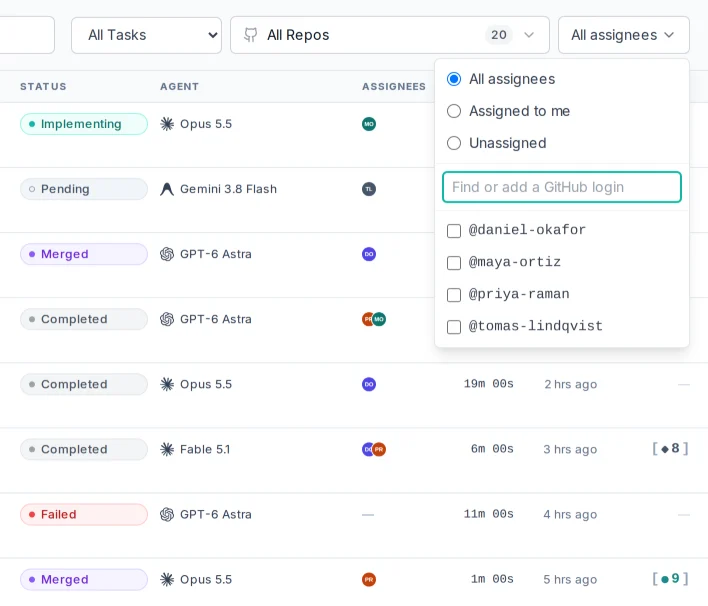
The Tasks screen shows each task's assignees and filters by Assigned to me, Unassigned or any set of people. /tasks?assignee=me opens your own queue.

ProPR assigns work through the issue or pull request behind it. Assign someone in ProPR and GitHub shows it. Assign them on GitHub and the Tasks screen shows it.
The Tasks screen shows each task's assignees and filters by Assigned to me, Unassigned or any set of people. /tasks?assignee=me opens your own queue.
The task page reads the live assignment from GitHub. Assign lists the repository's assignable users, writes the change to GitHub, and shows what GitHub applied.
Goals, plans, automations and to-dos show their creator's avatar and @login, so a shared list answers "whose is this?" at a glance.
Turn on automatic assignment for a repository and ProPR assigns each pull request when work on it completes: when the implementation opens it, and when a follow-up or /fix pushes a commit. It assigns the repository's default assignee, or the author of the source issue.
On a team, anyone allowed to trigger ProPR can comment a follow-up on any pull request. With the gate on, a pull request that has assignees starts work only from their comments, whether a slash command such as /fix or a plain follow-up.
The CLI filters with propr task list --assignee me and sets repository options with propr repo toggle --auto-assign on. MCP clients filter list_tasks by assignee. The gate and automatic assignment are off until you turn them on. The assignment guide lists every setting.