Implementation
The first run puts its captures in the pull request description, the first thing every reviewer opens.

Turn on visual previews for a repository and the implementing agent captures the screen it changed, as images, video, or both. ProPR posts the captures on the pull request, so you look at the result before you read a line of code.
On public propr #2952, Claude Opus 5.5 fixed truncated Antigravity labels in the Agent Tank sidebar. ProPR opened the pull request and ended its description with the agent's before/after capture, a title, and a note on what changed.
![Public ProPR pull request 2952 on GitHub, merged: the title [2948 by Claude Opus 5.5] Agent Tank sidebar truncates Antigravity window labels, the Conversation, Commits, Checks and Files changed tabs, and the description by the propr-dev bot, shortened to its AI Implementation Summary, Closes #2948, branch, commit and summary, ending in a Visual preview section: a before/after capture of the Agent Tank sidebar Usage block, where truncated Antigravity labels become Gemini and Claude and GPT groups with Weekly and 5h rows, and the agent note. The sidebar shows the AI and llm-claude-opus55 labels.](../../assets/screenshots/derived/github-2952-visual-preview-mobile@2x.png)
After it finishes the change, the agent decides whether the result shows up on screen. When it does, the agent runs the project's own tooling, such as Playwright, Storybook, a browser, an emulator, or a native renderer, and captures the changed state. A backend-only change gets no media.
Previews follow the work through its whole life on the pull request.
The first run puts its captures in the pull request description, the first thing every reviewer opens.
/fixA follow-up commit, including each /fix pass, posts new captures focused on that change in its completion comment.
A goal that implements directly refreshes the captures on its draft PR at every checkpoint.
![Public ProPR pull request 2874 on GitHub, merged: the title [2873 by Claude Opus 5.5] Agents -> Automations + UI cleanup, the top of its description, then the propr-dev completion comment: Applied the requested follow-up changes in commit 118c55b, the Summary of Changes, and a Visual preview section with a capture of the New automation form saving through a single Save button, followed by the 118c55b commit in the timeline.](../../assets/screenshots/derived/github-2874-visual-preview-mobile@2x.png)
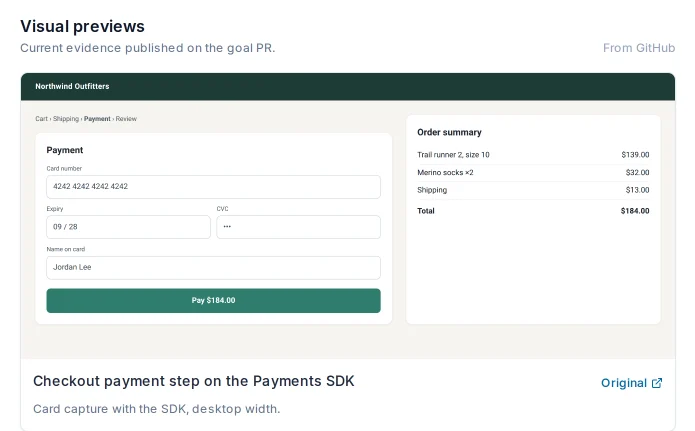
The captures sit on the same pull request where /review posts its findings and where you approve the merge. The review model judges the code: it reads the diff, the issue, and the history, and files numbered merge blockers. The previews show you what the user sees. Read both, and you catch the layout break a clean diff hides.
After /fix F1, the fix commit's comment carries its own captures. Compare them with the original and confirm the fix landed on screen as well as in the code. Ultrafix fix passes post theirs the same way.
Over MCP, list_visual_previews lists the captures on a task or pull request, and get_visual_preview hands your chat assistant a downscaled image to inspect. Videos come through as metadata and open on GitHub.
Visual previews are opt-in per repository. Choose images, videos, or both, and write capture instructions such as the pages and viewports to show. A repository's .propr/workflow.yml narrows the preview types and adds instructions of its own.
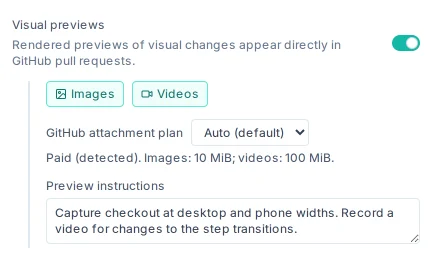
Previews publish as GitHub attachments, so images render in the pull request and videos play in GitHub's player. Images go up to 10 MiB; videos to 10 MiB on a Free GitHub plan and 100 MiB on a paid one.
Task and goal pages show the captures beside the work that produced them. Open the lightbox, zoom, and step through with the arrow keys.
The web UI and desktop app load private PR images through ProPR's authenticated media access. Connect Plus also keeps full-resolution originals: 25 GiB per installation, 500 MiB per file, 90 days.
/review scores the code and numbers what blocks the merge. The previews on the same PR show you the result.
Every capture comes from an isolated implementation run, with the prompt, logs, and diff on the same task.