Name it and pick the repositories
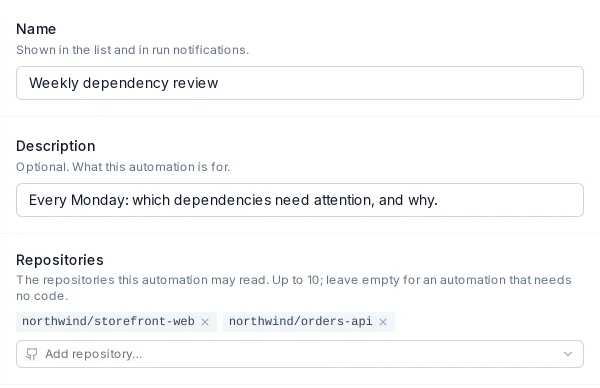
Open Automations and choose New Automation. Give it a name and up to ten repositories to read. A web-only report needs none.

Some questions need asking every week: which dependencies fell behind, which issues need triage, what a competitor shipped. Save the question once as an automation and ProPR answers it on schedule, in a Markdown report that says what changed since last time.
Open Automations and choose New Automation. Give it a name and up to ten repositories to read. A web-only report needs none.
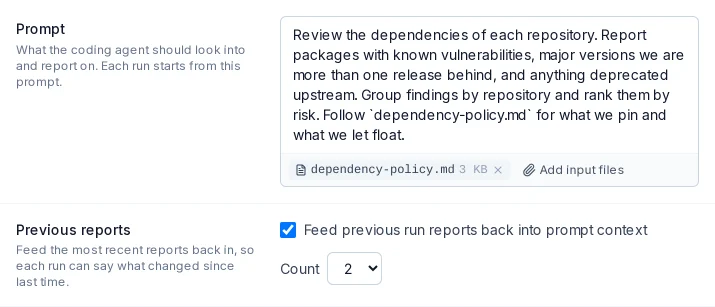
Write the prompt the way you would brief a colleague: what to look at, what matters, how to lay out the report. Attach a policy or checklist as an input file.
Turn on Previous reports and the last one to five reports feed the next run, so each report leads with what is new, changed or resolved.
Each run gets a read-only checkout of its repositories by default, and report runs never commit or push. Add web access for outside research, or ProPR tools to read tasks, PRs and todos (Claude Code and Codex).

Pick a preset or write a five-field cron. Schedules run in UTC, at most every 15 minutes, and the form previews the next run.

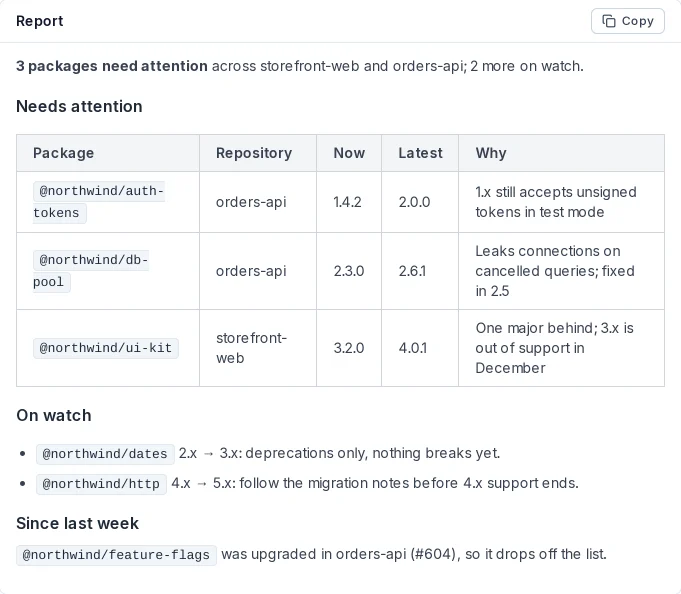
Each run lands in the automation's history with its Markdown report. Leave the autonomy on dry run and the report is the whole result.
Switch the autonomy to preview + approve, on Claude Code or Codex, and ProPR waits for your go-ahead before an acting step turns the report into tasks, plans and todos. With Agent Tank on, ProPR checks the agent's subscription capacity before each scheduled run and skips or defers the run near the limit. The Automations guide covers triggers, limits and the acting step.
A Markdown report on your schedule, built from a read-only look at your repositories, that leads with what changed since the last one.