Ship a UI fix with visual proof.

File the bug and let the agent show its work. With visual previews on, the pull request opens with a capture of the fixed screen, and every follow-up commit brings a fresh one. You see the result before you read a line of the diff.

Describe
Run isolated
Review in GitHub

Feature overview

You start with
A UI bug in a repository with visual previews on
You use
Visual previews · PR comments · /fix
Takes
One issue; the capture arrives with the PR
Real run
propr #2952

Turn on previews for the repository

Visual previews are opt-in per repository. Pick images, video, or both, and write capture instructions such as the pages and viewports to show.

Upload credentials and the .propr/workflow.yml overrides live in the visual previews docs.
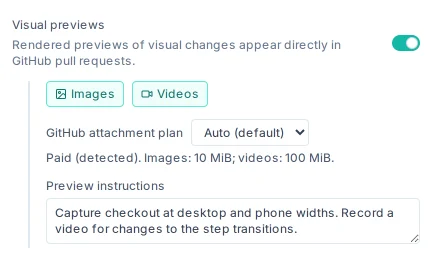
Visual previews switched on for storefront-web: images and videos, the detected GitHub attachment limits, and capture instructions

File the bug

Describe what looks wrong and where, as you would for a teammate. Start it as a New Task, or add ProPR's trigger label to a GitHub issue; the agent works in an isolated workspace.

@maintaineropened an issue

Checkout total wraps under the Pay button on phones

At 390 px the order total drops to a second line and the Pay button covers it. Keep the total on one line.

The agent captures what changed

After the fix, the agent decides whether the result shows on screen. When it does, it runs the project's own tooling, such as Playwright, Storybook, or an emulator, and captures the changed state: up to eight images or videos, each with a title and a note. Captures never enter your Git history. A backend-only change gets none, and a blocked capture names the tool the agent image lacks.

Read the PR from the top

The pull request description ends in a Visual preview section. Compare the capture with the bug report, then read the diff with the result already in mind.

Ask for a change, get a new capture

Comment on the PR, or run /fix on a /review's findings. The completion comment for that commit carries its own captures, focused on what the follow-up changed.

@maintainercommented on this pull request

Fixed on phones. At 768 px the Pay button now sits too far from the total; align them on one row.

@propr-dev[bot]example response

✅ Applied the requested follow-up changes in commit a1b2c3d

Visual preview: Checkout footer at 768 px, total and Pay button on one row.

A real fix, with its picture.

On public propr #2952, Claude Opus 5.5 fixed truncated labels in the Agent Tank sidebar. The PR description ends with the before/after capture and the agent's note.

Public ProPR pull request 2952 on GitHub, merged: the title [2948 by Claude Opus 5.5] Agent Tank sidebar truncates Antigravity window labels, and the propr-dev description shortened to its implementation summary, ending in a Visual preview section with a before/after capture of the Agent Tank sidebar Usage block and the agent's note.
The visual preview in the description of public propr #2952, shortened to the relevant parts.

A follow-up gets its own capture. On public propr #2874, the completion comment for commit 118c55b shows the New automation form after the change.

Public ProPR pull request 2874 on GitHub, merged: the top of its description, then the propr-dev completion comment Applied the requested follow-up changes in commit 118c55b, its Summary of Changes, and a Visual preview section with a capture of the New automation form saving through a single Save button.
A follow-up completion comment with its own visual preview on public propr #2874, shortened to the relevant parts.

What you get

A pull request that opens with a picture of the fix, a fresh capture with every follow-up commit, and the code review in the same thread.

Visual previews → All playbooks